How to Setup
Required Components
- ESP32 Development Board
- MicroSD Card Module
- MicroSD Card
- Jumper Wires
- Boardboard
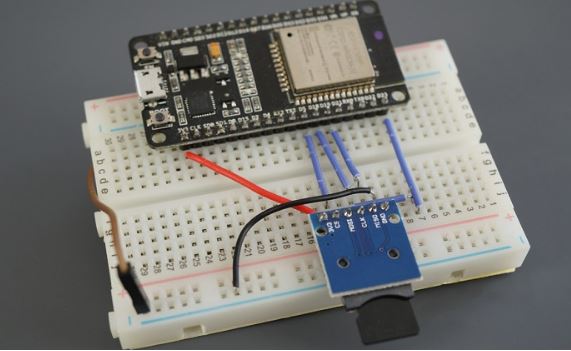
Preparing the microSD Card
The microSD card needs to be formatted as FAT32 before being used. Here are the steps to do that:
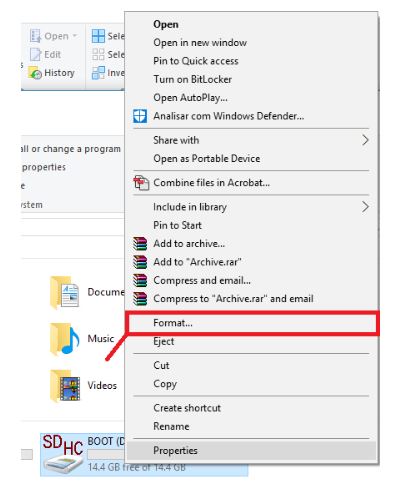
- Step 1: insert the microSD card into your computer, go to This PC(for windows) or in the Finder, choose Go > Computer(for macOS), right-click on the SDcard and click Format.
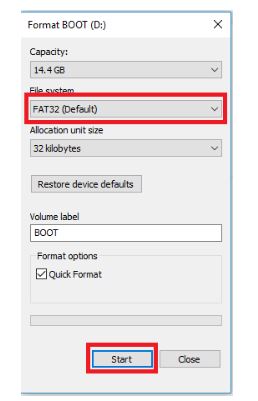
- Step 2: When a new window pops up, choose FAT32, press Start to initialize the formatting process and follow the onscreen instructions.
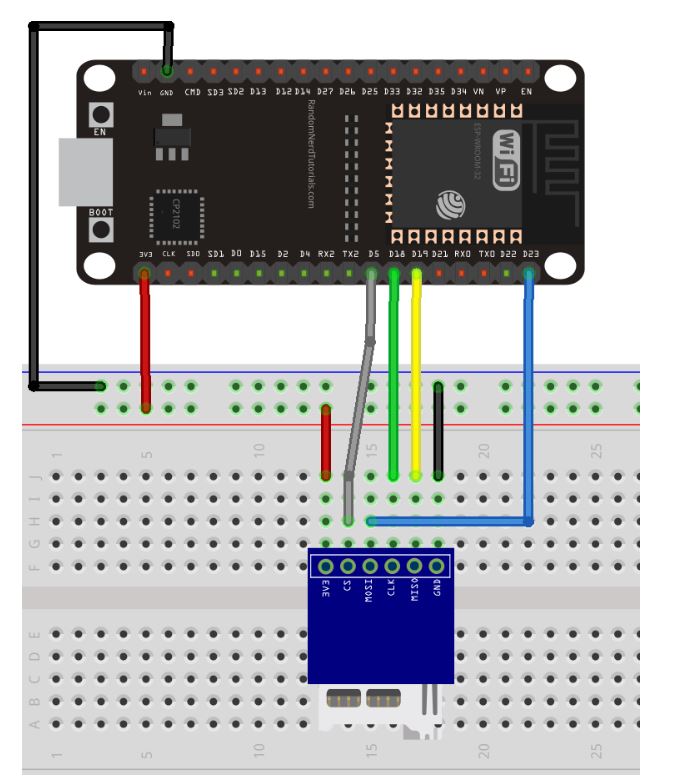
ESP32 with microSD Card Module - Schematic Diagram
Example Test Code
/* SD card and FAT filesystem example.
   This example uses SPI peripheral to communicate with SD card.
*/

#include <string.h>
#include <sys/unistd.h>
#include <sys/stat.h>
#include "esp_vfs_fat.h"
#include "sdmmc_cmd.h"
#include "sd_test_io.h"
#if SOC_SDMMC_IO_POWER_EXTERNAL
#include "sd_pwr_ctrl_by_on_chip_ldo.h"
#endif

#define EXAMPLE_MAX_CHAR_SIZE    64

static const char *TAG = "example";

#define MOUNT_POINT "/sdcard"

#ifdef CONFIG_EXAMPLE_DEBUG_PIN_CONNECTIONS
const char* names[] = {"CLK ", "MOSI", "MISO", "CS  "};
const int pins[] = {CONFIG_EXAMPLE_PIN_CLK,
                    CONFIG_EXAMPLE_PIN_MOSI,
                    CONFIG_EXAMPLE_PIN_MISO,
                    CONFIG_EXAMPLE_PIN_CS};

const int pin_count = sizeof(pins)/sizeof(pins[0]);
#if CONFIG_EXAMPLE_ENABLE_ADC_FEATURE
const int adc_channels[] = {CONFIG_EXAMPLE_ADC_PIN_CLK,
                            CONFIG_EXAMPLE_ADC_PIN_MOSI,
                            CONFIG_EXAMPLE_ADC_PIN_MISO,
                            CONFIG_EXAMPLE_ADC_PIN_CS};
#endif //CONFIG_EXAMPLE_ENABLE_ADC_FEATURE

pin_configuration_t config = {
    .names = names,
    .pins = pins,
#if CONFIG_EXAMPLE_ENABLE_ADC_FEATURE
    .adc_channels = adc_channels,
#endif
};
#endif //CONFIG_EXAMPLE_DEBUG_PIN_CONNECTIONS

// Pin assignments can be set in menuconfig, see "SD SPI Example Configuration" menu.
// You can also change the pin assignments here by changing the following 4 lines.
#define PIN_NUM_MISO  CONFIG_EXAMPLE_PIN_MISO
#define PIN_NUM_MOSI  CONFIG_EXAMPLE_PIN_MOSI
#define PIN_NUM_CLK   CONFIG_EXAMPLE_PIN_CLK
#define PIN_NUM_CS    CONFIG_EXAMPLE_PIN_CS

static esp_err_t s_example_write_file(const char *path, char *data)
{
    ESP_LOGI(TAG, "Opening file %s", path);
    FILE *f = fopen(path, "w");
    if (f == NULL) {
        ESP_LOGE(TAG, "Failed to open file for writing");
        return ESP_FAIL;
    }
    fprintf(f, data);
    fclose(f);
    ESP_LOGI(TAG, "File written");

    return ESP_OK;
}

static esp_err_t s_example_read_file(const char *path)
{
    ESP_LOGI(TAG, "Reading file %s", path);
    FILE *f = fopen(path, "r");
    if (f == NULL) {
        ESP_LOGE(TAG, "Failed to open file for reading");
        return ESP_FAIL;
    }
    char line[EXAMPLE_MAX_CHAR_SIZE];
    fgets(line, sizeof(line), f);
    fclose(f);

    // strip newline
    char *pos = strchr(line, '\n');
    if (pos) {
        *pos = '\0';
    }
    ESP_LOGI(TAG, "Read from file: '%s'", line);

    return ESP_OK;
}

void app_main(void)
{
    esp_err_t ret;

    // Options for mounting the filesystem.
    // If format_if_mount_failed is set to true, SD card will be partitioned and
    // formatted in case when mounting fails.
    esp_vfs_fat_sdmmc_mount_config_t mount_config = {
#ifdef CONFIG_EXAMPLE_FORMAT_IF_MOUNT_FAILED
        .format_if_mount_failed = true,
#else
        .format_if_mount_failed = false,
#endif // EXAMPLE_FORMAT_IF_MOUNT_FAILED
        .max_files = 5,
        .allocation_unit_size = 16 * 1024
    };
    sdmmc_card_t *card;
    const char mount_point[] = MOUNT_POINT;
    ESP_LOGI(TAG, "Initializing SD card");

    // Use settings defined above to initialize SD card and mount FAT filesystem.
    // Note: esp_vfs_fat_sdmmc/sdspi_mount is all-in-one convenience functions.
    // Please check its source code and implement error recovery when developing
    // production applications.
    ESP_LOGI(TAG, "Using SPI peripheral");

    // By default, SD card frequency is initialized to SDMMC_FREQ_DEFAULT (20MHz)
    // For setting a specific frequency, use host.max_freq_khz (range 400kHz - 20MHz for SDSPI)
    // Example: for fixed frequency of 10MHz, use host.max_freq_khz = 10000;
    sdmmc_host_t host = SDSPI_HOST_DEFAULT();

    // For SoCs where the SD power can be supplied both via an internal or external (e.g. on-board LDO) power supply.
    // When using specific IO pins (which can be used for ultra high-speed SDMMC) to connect to the SD card
    // and the internal LDO power supply, we need to initialize the power supply first.
#if CONFIG_EXAMPLE_SD_PWR_CTRL_LDO_INTERNAL_IO
    sd_pwr_ctrl_ldo_config_t ldo_config = {
        .ldo_chan_id = CONFIG_EXAMPLE_SD_PWR_CTRL_LDO_IO_ID,
    };
    sd_pwr_ctrl_handle_t pwr_ctrl_handle = NULL;

    ret = sd_pwr_ctrl_new_on_chip_ldo(&ldo_config, &pwr_ctrl_handle);
    if (ret != ESP_OK) {
        ESP_LOGE(TAG, "Failed to create a new on-chip LDO power control driver");
        return;
    }
    host.pwr_ctrl_handle = pwr_ctrl_handle;
#endif

    spi_bus_config_t bus_cfg = {
        .mosi_io_num = PIN_NUM_MOSI,
        .miso_io_num = PIN_NUM_MISO,
        .sclk_io_num = PIN_NUM_CLK,
        .quadwp_io_num = -1,
        .quadhd_io_num = -1,
        .max_transfer_sz = 4000,
    };

    ret = spi_bus_initialize(host.slot, &bus_cfg, SDSPI_DEFAULT_DMA);
    if (ret != ESP_OK) {
        ESP_LOGE(TAG, "Failed to initialize bus.");
        return;
    }

    // This initializes the slot without card detect (CD) and write protect (WP) signals.
    // Modify slot_config.gpio_cd and slot_config.gpio_wp if your board has these signals.
    sdspi_device_config_t slot_config = SDSPI_DEVICE_CONFIG_DEFAULT();
    slot_config.gpio_cs = PIN_NUM_CS;
    slot_config.host_id = host.slot;

    ESP_LOGI(TAG, "Mounting filesystem");
    ret = esp_vfs_fat_sdspi_mount(mount_point, &host, &slot_config, &mount_config, &card);

    if (ret != ESP_OK) {
        if (ret == ESP_FAIL) {
            ESP_LOGE(TAG, "Failed to mount filesystem. "
                     "If you want the card to be formatted, set the CONFIG_EXAMPLE_FORMAT_IF_MOUNT_FAILED menuconfig option.");
        } else {
            ESP_LOGE(TAG, "Failed to initialize the card (%s). "
                     "Make sure SD card lines have pull-up resistors in place.", esp_err_to_name(ret));
#ifdef CONFIG_EXAMPLE_DEBUG_PIN_CONNECTIONS
            check_sd_card_pins(&config, pin_count);
#endif
        }
        return;
    }
    ESP_LOGI(TAG, "Filesystem mounted");

    // Card has been initialized, print its properties
    sdmmc_card_print_info(stdout, card);

    // Use POSIX and C standard library functions to work with files.

    // First create a file.
    const char *file_hello = MOUNT_POINT"/hello.txt";
    char data[EXAMPLE_MAX_CHAR_SIZE];
    snprintf(data, EXAMPLE_MAX_CHAR_SIZE, "%s %s!\n", "Hello", card->cid.name);
    ret = s_example_write_file(file_hello, data);
    if (ret != ESP_OK) {
        return;
    }

    const char *file_foo = MOUNT_POINT"/foo.txt";

    // Check if destination file exists before renaming
    struct stat st;
    if (stat(file_foo, &st) == 0) {
        // Delete it if it exists
        unlink(file_foo);
    }

    // Rename original file
    ESP_LOGI(TAG, "Renaming file %s to %s", file_hello, file_foo);
    if (rename(file_hello, file_foo) != 0) {
        ESP_LOGE(TAG, "Rename failed");
        return;
    }

    ret = s_example_read_file(file_foo);
    if (ret != ESP_OK) {
        return;
    }

    // Format FATFS
#ifdef CONFIG_EXAMPLE_FORMAT_SD_CARD
    ret = esp_vfs_fat_sdcard_format(mount_point, card);
    if (ret != ESP_OK) {
        ESP_LOGE(TAG, "Failed to format FATFS (%s)", esp_err_to_name(ret));
        return;
    }

    if (stat(file_foo, &st) == 0) {
        ESP_LOGI(TAG, "file still exists");
        return;
    } else {
        ESP_LOGI(TAG, "file doesn't exist, formatting done");
    }
#endif // CONFIG_EXAMPLE_FORMAT_SD_CARD

    const char *file_nihao = MOUNT_POINT"/nihao.txt";
    memset(data, 0, EXAMPLE_MAX_CHAR_SIZE);
    snprintf(data, EXAMPLE_MAX_CHAR_SIZE, "%s %s!\n", "Nihao", card->cid.name);
    ret = s_example_write_file(file_nihao, data);
    if (ret != ESP_OK) {
        return;
    }

    //Open file for reading
    ret = s_example_read_file(file_nihao);
    if (ret != ESP_OK) {
        return;
    }

    // All done, unmount partition and disable SPI peripheral
    esp_vfs_fat_sdcard_unmount(mount_point, card);
    ESP_LOGI(TAG, "Card unmounted");

    //deinitialize the bus after all devices are removed
    spi_bus_free(host.slot);

    // Deinitialize the power control driver if it was used
#if CONFIG_EXAMPLE_SD_PWR_CTRL_LDO_INTERNAL_IO
    ret = sd_pwr_ctrl_del_on_chip_ldo(pwr_ctrl_handle);
    if (ret != ESP_OK) {
        ESP_LOGE(TAG, "Failed to delete the on-chip LDO power control driver");
        return;
    }
#endif
}